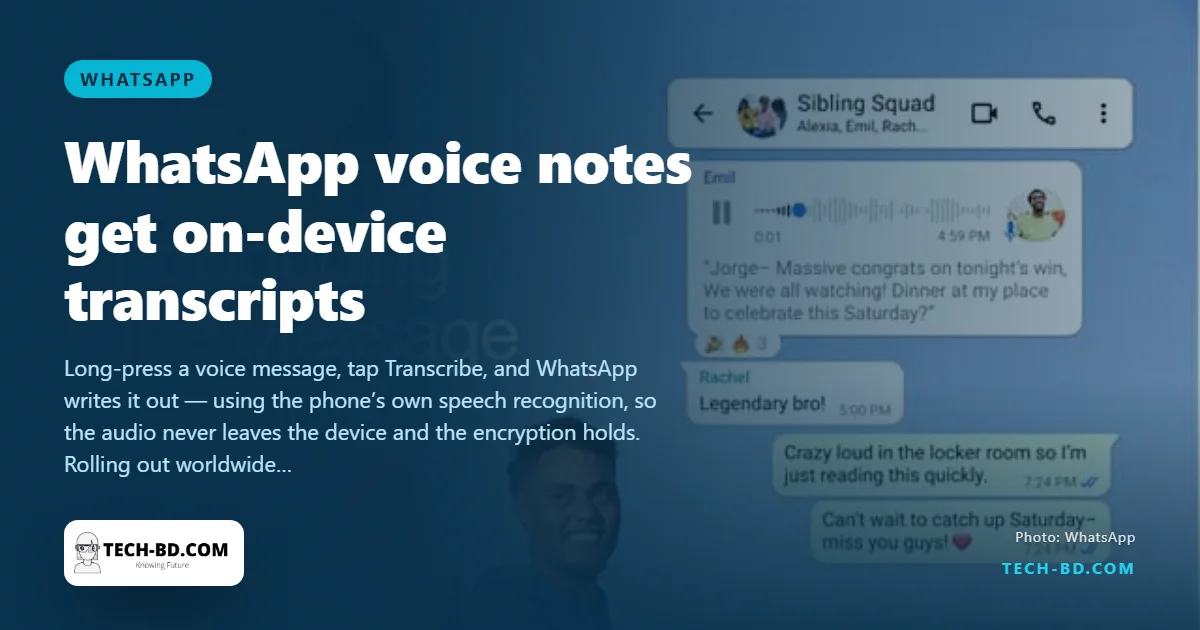
The voice note is Bangladesh’s favourite message format and its most annoying: impossible to read in a meeting, on a bus, or in a room with a television on, and impossible to search afterwards for the address someone said in the middle of it. WhatsApp is now rolling out voice message transcripts — tap a button and the note is written out under the audio — to all users worldwide over the next few weeks.
How to use it
- Open Settings → Chats → Voice message transcripts and turn it on.
- Choose the language your voice notes are usually in. The phone downloads a small language pack.
- Long-press any voice message and tap Transcribe. The text appears beneath the note and stays there.
Transcripts are generated only when you ask, one message at a time, and only for messages you have received.
Why it is safe
The question with any transcription feature in an encrypted app is where the audio goes. WhatsApp’s answer is: nowhere. The speech recognition runs on the phone, using the language pack downloaded in step 2, so the audio is never sent to Meta’s servers and the end-to-end encryption that protects the message is not broken. Meta says explicitly that nobody, including WhatsApp, can hear or read the note. It also means the feature works with no internet connection, and that its accuracy depends on your phone rather than a data centre — expect it to be good on a recent phone and rough on a cheap one.
The language problem
At launch the feature supports a short list: on Android, English, Spanish, Portuguese and Russian; on iPhone a few more, including Hindi, Japanese and Korean, because Apple’s on-device recognition supports more languages. Bangla is not on either list. WhatsApp says more languages are coming, without dates. For Bangladesh, the country whose grandmothers, tailors and delivery riders communicate almost entirely by voice note, that is the whole feature. Until Bangla arrives, the transcription will be useful for English-language work chats and little else.
A workaround, and a warning
Google’s Recorder app on Pixels and Samsung’s voice recorder both transcribe Bangla, and Android’s Live Caption can caption a playing voice note in some languages — but each of those routes the audio through the phone’s speaker or, in some cases, a cloud service, and the privacy guarantee WhatsApp offers does not apply. If the note is sensitive, wait for the real thing.
Why on-device transcription cannot do Bangla yet
The thing that makes this feature private is also what limits the languages, and the two cannot be separated.
Doing the work on the phone means the model has to fit on the phone — a download of a few hundred megabytes per language, running in the memory a messaging app is allowed, fast enough that a two-minute note does not take two minutes. A server-side system can be enormous and multilingual; a device-side one ships one compact model per language and each has to be built, trained and tested separately.
So the list grows in the order of commercial priority, and it begins with the languages whose speech data is most plentiful. Bangla has the speakers but not the labelled audio: transcribed speech corpora in Bangla are a fraction of what exists for Hindi, and far less again than English. The code-switching that is normal here makes it harder still — a note that runs “kal bikale amar office e ekta meeting ache, please confirm koro” needs both languages inside one sentence.
And a word on the workarounds
Forwarding a sensitive voice note to a third-party transcription bot or website undoes the entire point. The audio leaves your phone, lands on somebody else’s server and is governed by whatever that service’s policy says — which is the opposite of the guarantee WhatsApp is offering here. For anything that matters, wait.
Source: Indian Express, via Prothom Alo.